| Support Category: Navigation |
| Specialist Notes: |
Cornerstone offers the option to add post course work for learning objects after training is completed. This often takes the form of a quiz. While normally quizzes are included in the training, some course creators might opt to make them separate. This SR is to help users navigate to the Post-Work should their training have the “Pending Post-Work” status.
HOW SHOULD WE ASSIST? Should the user inquire about Post-Work or Post Course Work, kindly request the name of the training and check the status. If the status of the course shows “Pending Post-Work” provide them with this SR. Otherwise, escalate. |
| Standard Response: |
To access your Post Course Work, kindly follow the directions below:
1. Log into your CAPS LMS account.
2. Hover over 'Learning' and click on 'Transcript' on the homepage.
3. On your Transcript page, find the specific course you are trying to complete.
4. To the right of the course, find the View Post-Work button.

5. On the following page, click on View Post-Work again to the right.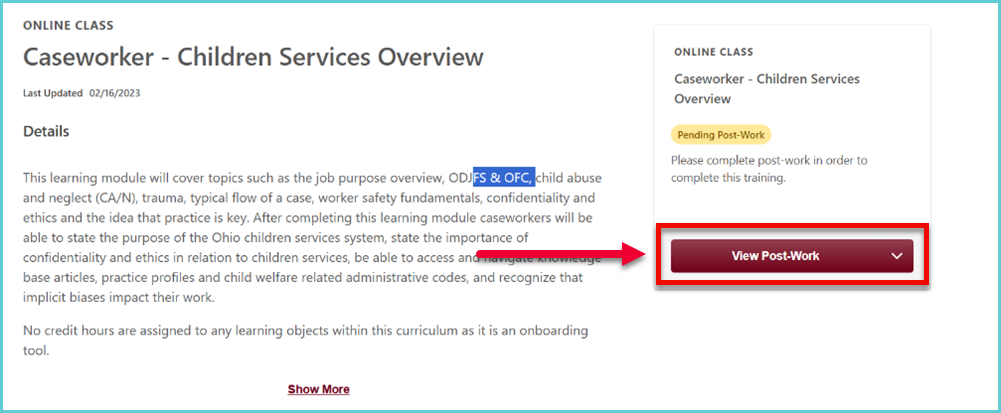
6. You will be taken to the course details page. Under Post-Work click on the Launch Test button. 
If you do not see the Launch Test button, you may have to click the Activate button.
Should you have any questions or require additional assistance, please let us know.